

haroonkhanmarwat@gmail.com
Categories
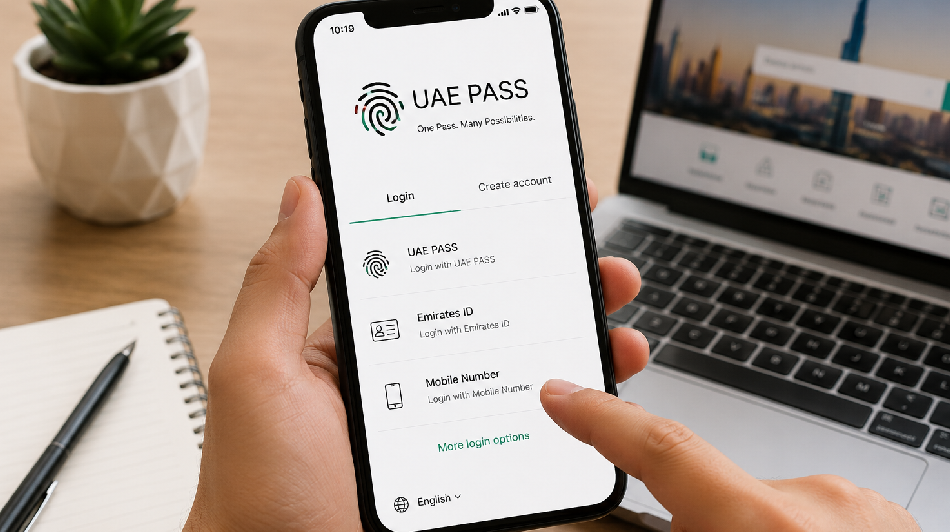
UAE PASS has made it easier for people in the United Arab Emirates to access government and private-sector services online. Instead of creating separate usernames and passwords for different platforms, users can sign in securely with one digital identity.
This UAE PASS registration guide explains how to download the application, create an account, verify your identity and start using UAE PASS. It also covers the documents you may need, common registration problems and practical security tips.
What Is UAE PASS?
UAE PASS is the UAE’s national digital identity system for citizens, residents and visitors. It allows registered users to securely access participating government and private-sector platforms through one account.
Depending on the service and the verification level of your account, UAE PASS may also allow you to:
- Log in to participating government websites and applications.
- Access selected private-sector digital services.
- Digitally sign supported documents.
- Verify digitally signed documents.
- Request and share digital versions of supported official documents.
- Complete certain applications without visiting a service centre.
Availability can vary between service providers. Some services may require a fully verified UAE PASS account before they can be accessed.
Who Can Register for UAE PASS?
UAE PASS is available to eligible UAE citizens, residents, GCC nationals and visitors. The identification document used during registration depends on the user’s status.
The official UAE PASS platform currently supports registration using:
- Emirates ID
- GCC ID
- Passport
UAE residents will normally register using their Emirates ID. Visitors and other eligible users may be able to register with a passport, subject to the options displayed in the application.
What Do You Need for UAE PASS Registration?
Before starting the UAE PASS account registration process, keep the following items ready:
- A compatible smartphone with internet access.
- The official UAE PASS mobile application.
- A valid Emirates ID, GCC ID or passport, depending on your status.
- An active mobile number that can receive verification messages.
- An active email address.
- Access to the smartphone camera for identity and facial verification.
Make sure your identification document is valid and that the personal information you enter matches your official records.
How to Register for UAE PASS
Step 1: Download the Official UAE PASS App
Download the UAE PASS application from the Apple App Store or Google Play Store. Check that you are installing the official application before entering any personal information.
Avoid downloading UAE PASS files from unofficial websites, messages or unknown links. Using the official application helps protect your identity and account information.
Step 2: Open the App and Select Sign Up
Open the UAE PASS app and select the option to create a new account. The wording may appear as “Sign Up” or a similar registration option, depending on the current version of the application.
If you previously created an account, do not register again unnecessarily. Select the account recovery or existing-account option instead.
Step 3: Choose Your Identification Document
Select the identification method available for your user category. You may be asked to register using an Emirates ID, GCC ID or passport.
Residents should keep both sides of their Emirates ID ready. Follow the instructions shown on the screen to scan or enter the requested identification information.
Step 4: Confirm Your Personal Information
Review the personal details displayed or requested by the application. These may include your name, nationality, date of birth or identification number.
Enter the information exactly as it appears on your official document. Differences in spelling, document numbers or personal details may delay the registration process.
Step 5: Verify Your Mobile Number
Enter your active mobile number when requested. UAE PASS may send a one-time password or verification code to confirm that you have access to the number.
Enter the code within the permitted time. Do not share a one-time password with another person, including anyone claiming to provide technical support.
Step 6: Add and Verify Your Email Address
Provide an email address that you regularly use. You may receive an email verification message or additional instructions as part of the account setup process.
Check your spam or junk folder if the verification email does not appear in your main inbox.
Step 7: Create Your UAE PASS PIN
Create a secure PIN for accessing and approving activities through your UAE PASS account. Choose a PIN that is difficult for another person to guess.
Do not use obvious combinations such as your birth year, repeating numbers or part of your mobile number. Never share your UAE PASS PIN with anyone.
Step 8: Complete Facial Verification
Follow the application’s instructions to complete facial verification. The UAE PASS app uses facial recognition to help confirm the identity of the person registering.
For better results:
- Stand in a well-lit location.
- Keep your face clearly visible.
- Remove sunglasses, masks or other face coverings when appropriate.
- Hold the phone steady at face level.
- Follow the movement or positioning instructions shown in the app.
Successful facial verification may allow eligible users to complete the process without visiting a government service centre.
Step 9: Verify Through a UAE PASS Kiosk if Required
If facial verification is unsuccessful or the application asks for additional identity verification, you may need to visit an authorised UAE PASS kiosk.
Use the official UAE PASS kiosk locator to find a nearby location. Take your original identification document and follow the instructions provided at the kiosk.
Step 10: Start Using Your UAE PASS Account
After completing the required registration and verification steps, you can use UAE PASS to sign in to participating digital services.
When a website or application offers UAE PASS login, select the UAE PASS option. You may receive an approval request through the mobile app. Review the service name and request details carefully before approving access.
Basic and Verified UAE PASS Accounts
The services available to you may depend on whether your account is basic or fully verified. A basic account may provide limited access, while a verified account confirms your identity to a higher level and may unlock additional services.
Certain government transactions, document-sharing functions and digital signature services may require full account verification. Follow the instructions in the application if an account upgrade is required.
How to Use UAE PASS for Online Services
Once your account is active, you can use UAE PASS on supported websites and mobile applications by following these general steps:
- Visit the participating service provider’s official website or app.
- Select “Login with UAE PASS”.
- Enter the requested UAE PASS account information, if required.
- Open the UAE PASS app when you receive an authentication request.
- Check the name of the service requesting access.
- Approve the request securely through the app.
- Return to the service provider’s platform to continue.
Never approve a login or document-signing request that you did not initiate.
Common UAE PASS Registration Problems
Verification Code Not Received
Confirm that the mobile number is correct and that your phone has an active network connection. Wait briefly before requesting another code. Restarting the application or device may also help.
Emirates ID Cannot Be Scanned
Clean the card and camera lens, place the Emirates ID on a plain surface and use sufficient lighting. Make sure all edges of the card are visible and avoid glare.
Facial Verification Is Unsuccessful
Move to a brighter location, keep the camera steady and ensure your full face is visible. Remove items that may block facial recognition. If repeated attempts fail, use an authorised UAE PASS kiosk where available.
Personal Details Do Not Match
Check that the information entered matches your Emirates ID, GCC ID or passport. If the official records contain outdated details, you may need to update them with the relevant issuing authority before trying again.
Account Already Exists
Use the UAE PASS account recovery option instead of creating a duplicate account. This may also apply when changing phones or registering UAE PASS on a new device.
Forgotten UAE PASS PIN
Use the PIN recovery option available in the application. Complete the identity-verification steps requested by UAE PASS and create a new secure PIN.
How to Register UAE PASS on a New Phone
If you replace your mobile phone, install the official UAE PASS app on the new device and select the option indicating that you already have an account.
Follow the account recovery or new-device registration process. You may be asked to verify your mobile number, identification information and identity before the account can be activated on the new phone.
Do not create another account unless the official UAE PASS process specifically instructs you to do so.
UAE PASS Security Tips
UAE PASS may provide access to important personal and government services, so account security should be taken seriously.
- Keep your UAE PASS PIN private.
- Never share one-time passwords or authentication codes.
- Use a screen lock, fingerprint or facial security on your phone.
- Download the app only from an official app store.
- Do not approve unexpected login or signature requests.
- Keep your phone’s operating system and UAE PASS app updated.
- Avoid accessing sensitive services through unsecured public Wi-Fi.
- Contact official UAE PASS support if you suspect unauthorised activity.
Benefits of Registering for UAE PASS
Completing UAE PASS registration can make everyday digital transactions in the UAE more convenient. Its main benefits include:
- One digital identity for multiple participating services.
- Reduced dependence on separate usernames and passwords.
- Secure online identity verification.
- Access to supported digital government services.
- Digital document signing and verification where available.
- Sharing of supported digital documents.
- Fewer in-person visits for eligible transactions.
Frequently Asked Questions About UAE PASS Registration
Is UAE PASS available only to UAE citizens?
No. UAE PASS is designed for eligible citizens, residents and visitors. The registration document and available features may differ according to the user’s status.
Can I register for UAE PASS without an Emirates ID?
The official platform supports registration using an Emirates ID, GCC ID or passport. The options available to you will depend on your eligibility and the instructions displayed in the application.
Can I verify UAE PASS without visiting a kiosk?
Eligible users may verify their identity through the facial verification process in the UAE PASS app. A kiosk may be required if facial verification cannot be completed or if additional verification is requested.
How long does UAE PASS registration take?
The process can often be completed within a few minutes when the required documents, mobile number and facial verification are available. It may take longer if kiosk verification or account recovery is required.
Why is my UAE PASS account not working on a government website?
The service may require a higher account verification level, or there may be a temporary technical issue. Check whether your UAE PASS account is verified, update the application and try again through the service provider’s official platform.
Can I use one UAE PASS account on multiple phones?
For security reasons, registering a new device may require account recovery and identity verification. Follow the existing-account or new-device instructions shown in the UAE PASS application.
Can someone register UAE PASS on my behalf?
UAE PASS registration includes personal identity and facial verification steps. Account holders should complete the process themselves and should never disclose their PIN or verification codes to another person.
Where can I get official UAE PASS support?
For official help, visit the UAE PASS support website or contact UAE PASS through its published customer support channels. Always verify that you are using an official UAE PASS website before sharing personal information.
Final Thoughts
UAE PASS registration provides a secure and convenient way to access a growing range of digital services across the UAE. Most eligible users can begin by downloading the official app, selecting Sign Up, providing an accepted identification document and completing facial verification.
If online verification is unsuccessful, an authorised UAE PASS kiosk may be used to complete or upgrade the account. Keeping your mobile number active, entering accurate personal details and protecting your PIN will help ensure a smoother and safer UAE PASS experience.
Official UAE PASS Resources
Disclaimer: This guide is provided for general informational purposes. UAE PASS registration requirements, application screens and verification procedures may be updated by the relevant authorities. Users should confirm the latest requirements through the official UAE PASS platform.